
Phone Farm: The Complete 2026 Guide to Building, Buying & Scaling a Phone Farm Box
A phone farm is a group of real smartphones — usually Android — set up together and controlled from one computer to run tasks like social media management, app testing, or automation at scale. The physical hardware that holds and powers those phones (the rack, chassis, USB hub, and cabling) is called a phone farm box, sometimes written as box phone farm or phone box farm. A basic 20-phone farm box costs roughly $150–$400 in hardware, not counting the phones themselves.
What Is a Phone Farm?
A phone farm is a set of real, physical smartphones — typically 5 to 100+ Android devices — connected to shared power, networking, and control software so one person can operate all of them from a single computer screen. Instead of emulators or cloud-based virtual devices, a phone farm uses genuine hardware, which is why platforms and apps treat it differently from bot traffic or emulated sessions.
People build phone farms for a wide range of reasons, and the term itself is neutral — it describes the infrastructure, not the intent behind it. Common legitimate use cases include:
- Social media management — agencies and creators running multiple brand or client accounts
- App and QA testing — developers testing an app across many real device models and OS versions simultaneously
- Affiliate and e-commerce operations — managing multiple storefronts, marketplaces, or ad accounts
- Content distribution — streamers and creators re-posting clips across accounts
- Ad verification and geo-testing — confirming how ads or apps render in different regions
At the same time, the same hardware setup can be misused for ad fraud, fake engagement, or click fraud — which is why some industry sources (like ad-fraud detection vendors) define the term narrowly around abuse. Both descriptions are accurate; the hardware doesn’t determine the use, the operator does. This guide covers the infrastructure itself: how to plan, build, and run one responsibly.
Phone Farm vs. Click Farm vs. Device Farm
These three terms get used interchangeably, but they’re not identical:
| Term | What it usually means |
| Phone farm | The general term for a collection of physical phones run as shared infrastructure — hardware-neutral, used across social media, testing, automation, and fraud contexts |
| Click farm | A phone or device farm specifically operated to generate fake clicks, views, or engagement — almost always associated with fraud |
| Device farm | A broader category that can include phones, tablets, and even emulated devices — often used in the QA/testing industry (e.g., cloud device farms for app testing) |
If you’re researching how to build the hardware, “phone farm” and “phone farm box” are the terms you want. “Click farm” specifically implies fraudulent intent, and “device farm” often points you toward cloud/emulator services rather than physical hardware guides.
What Is a Phone Farm Box? (Box Phone Farm Explained)
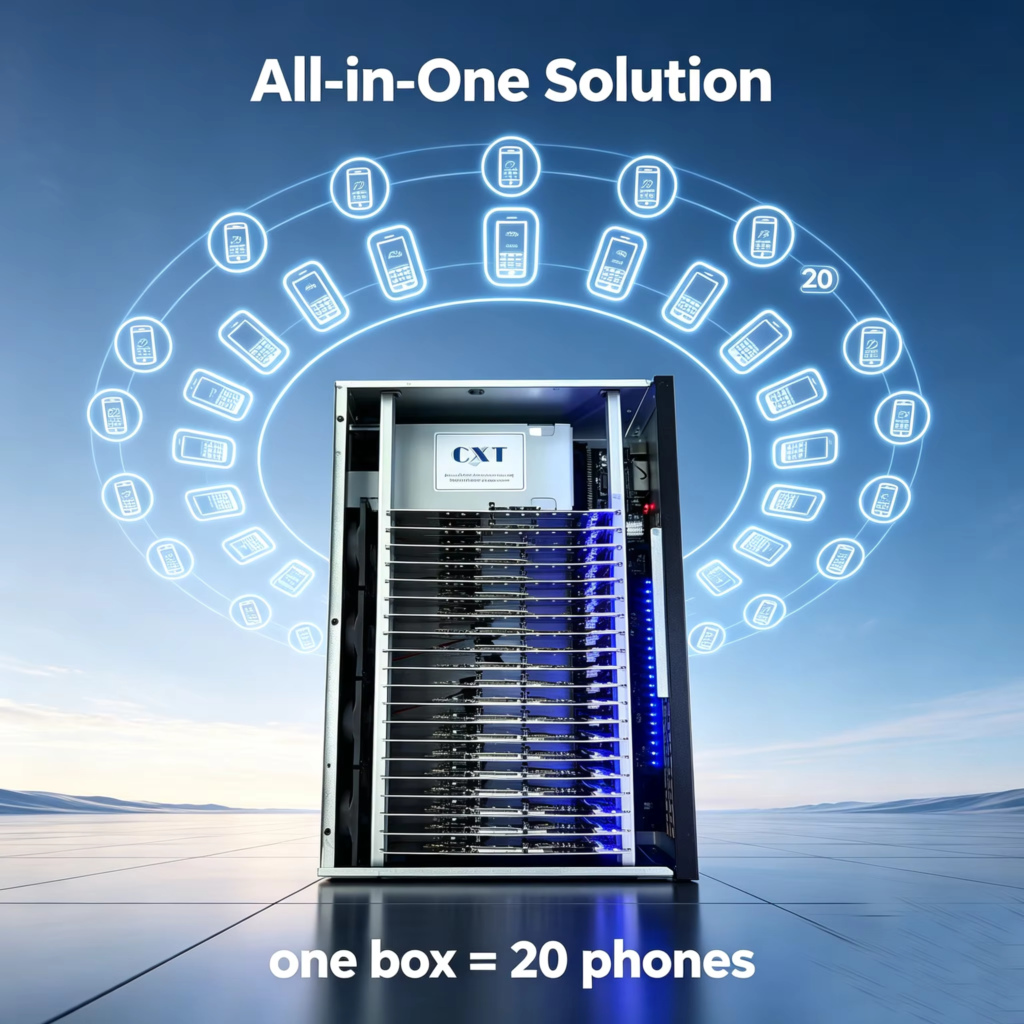
A phone farm box — also searched as box phone farm or phone box farm — is the physical enclosure or rack system that holds multiple phones in one place, routes their charging and data cables to a central point, and keeps the whole setup organized, cooled, and easy to maintain. It’s the hardware layer of a phone farm, as opposed to the software or networking layer.
There are two main types of phone farm box:
1. Chassis (power and data separated)
A chassis holds the phones physically and organizes power separately from the USB data connection. This is the more common DIY approach: you mount the phones in slots, run a bundle of short USB data cables to a USB hub board, and run power separately through a dedicated adapter and cable set. It’s cheaper and more flexible but requires more manual cable management.
2. Dock hub (power and data integrated)
A dock hub combines charging and data transfer into a single connector per phone slot, so you’re not managing two separate cable runs per device. This is faster to set up and looks cleaner, but it’s usually more expensive per port and less flexible if you’re mixing phone models with different port types or thicknesses.
Some pre-built boxes go a step further and include a phone motherboard, SIM card slot, and camera module built directly into the enclosure — essentially a “phone without the physical shell” — which is a growing category for operators who don’t want to source second-hand phones individually at all.
Bottom line: if someone searches “phone farm box,” “box phone farm,” or “phone box farm,” they’re almost always looking for this physical rack/chassis/dock hardware — not the software or the phones themselves. Keep that distinction in mind whether you’re buying one or building one.
3 Phone Farm Models Compared
Before building anything, decide which model actually fits your scale and technical comfort:
| Model | What it is | Best for | Main weakness |
| DIY shelf farm | Phones on a shelf or acrylic holder, minimal organization, manual cable routing | Testing an idea with 5–10 phones | Breaks down fast past ~10 devices; messy cabling, no cooling plan |
| Phone farm box (chassis/dock hub) | Phones mounted in a dedicated chassis or dock hub with a shared USB hub board and power adapter | 10–50+ device operators who want density, organization, and local control | Still requires on-site maintenance, cooling, and manual recovery when a device fails |
| Managed remote farm | Devices hosted in a data center and controlled remotely via API/dashboard, no physical ownership | Teams that want to skip hardware ownership entirely and pay for uptime instead | Higher recurring cost; no physical control over the hardware |
Most people searching for “phone farm box” specifically already know they want to own physical hardware rather than rent a managed/cloud solution — this guide focuses on that path, but the comparison matters because it tells you the ceiling of the box model: past roughly 50–100 devices, the operational burden of a self-hosted box farm (cooling, recovery, staffing) usually starts to outweigh its lower recurring cost.
Complete Hardware Checklist for a Phone Farm Box
Here’s everything you need, in the order you’ll actually buy and assemble it.
1. Phones
Buy Android 6.0+ devices (Samsung, Xiaomi, Redmi, Huawei, VIVO, or similar) from second-hand markets, wholesale lots, or refurbishers. For a phone farm box specifically, using the same model across the whole box is strongly recommended — it means one chassis slot size, one set of cable lengths, and one USB debugging setup instead of troubleshooting model-by-model quirks. If you’re sourcing from a wholesale lot, test a representative sample first and set written battery/cosmetic grade standards before buying the full batch.
2. USB hub board
This is the central nervous system of your phone farm box — it connects every phone’s data line back to a single computer. Standard boards support 20 or 21 USB ports. Buy one rated for your exact device count with a little headroom (e.g., a 21-port board for a 20-phone box), since running a board at full capacity 24/7 shortens its lifespan.
3. Power adapter
Phones need stable, continuous power — this is not the place to cut corners. Size your adapter to your device count: a 20–25 phone box typically needs a 5V/40A adapter, while a 40–50 phone box needs 5V/60A or higher. Undersized power adapters are one of the most common causes of random reboots and charging failures in DIY box farms.
4. Data cables
Use short (6–12″) USB cables between each phone and the hub board. Short cables reduce tangling, reduce signal loss, and make it dramatically easier to trace a specific phone’s connection when something goes wrong.
5. Socket, power cord & cable management
A dedicated power strip/socket rated for continuous load, plus cable trays or velcro ties (not zip ties — you’ll be reconfiguring this more than you think). Keep 10–20% spare cables on hand for replacements.
6. Chassis or dock hub
This is the physical enclosure — see the phone farm box section above for the chassis-vs-dock-hub tradeoff. Choose based on whether you want cheaper/flexible (chassis) or faster-to-deploy/cleaner (dock hub).
7. Cooling
Phones running 24/7 generate real heat, and heat is the #1 killer of batteries in a box farm.
| Fleet size | Cooling solution | Rough cost |
| 1–10 phones | USB desk fan | $15–$30 |
| 10–25 phones | Standing fan + open-frame rack | $50–$100 |
| 25–50 phones | Dedicated room with AC | $200–$500 |
| 50+ phones | Server-room-grade HVAC | $1,000+ |
8. Screen mirroring software
You need to see and control every phone from one screen. Free, open-source options like scrcpy are the industry standard for a reason — excellent performance with zero licensing cost. Purpose-built mirroring tools built for large fleets (often free up to 30–40 devices) are worth evaluating if you want a lighter learning curve than raw ADB commands.
How to Build a Phone Box Farm, Step by Step
- Choose and acquire your phones. Same model, Android 6.0+, verified battery health. Buy 10–20% extra as spares/replacements.
- Enable USB debugging on every phone. This is required for the hub board and mirroring software to detect and control each device — go through Settings > About Phone > tap Build Number 7 times, then enable USB Debugging under Developer Options.
- (Optional, advanced) Convert to motherboard-only power. For a denser, cleaner box, some operators remove the battery and wire the phone’s motherboard directly to a stable power source — not all models support this, so confirm compatibility before disassembling anything.
- Mount the phones in the chassis or dock hub. Keep consistent spacing for airflow — don’t pack devices edge-to-edge if you’re relying on passive cooling.
- Wire the USB hub board. Connect each phone to the hub with a short data cable, then connect the hub to your control computer.
- Wire power separately (chassis model) or confirm integrated power (dock hub model). Test voltage under full load before leaving it running unattended.
- Install and configure your mirroring software. Confirm every phone appears and responds to touch/swipe input from the control screen before moving on.
- Test for 24–48 hours at partial load. Run half your fleet for a full day/night cycle to catch power, heat, or connectivity issues before scaling to full capacity.
- Label everything. Device number, matching cable label, and a spreadsheet mapping device → account → notes. This single habit saves the most troubleshooting time later.
- Document your working configuration with photos. When cables inevitably get messy during future maintenance, you’ll have a reference for the correct setup.
Software Stack: Controlling Your Phone Farm
Hardware gets your phones physically connected; software is what makes the farm actually usable day to day. A working stack needs three layers:
Screen mirroring & control — scrcpy (free, open source) or a commercial alternative for viewing and interacting with every device from one screen. This is non-negotiable; you cannot operate a box farm by physically handling each phone.
Automation engine — three broad approaches, in order of technical difficulty:
- Managed automation platforms — GUI-based, subscription-priced, no coding required, fastest to get running
- ADB scripting — free, full control, requires basic Python/command-line comfort
- On-device macro apps (Tasker, AutoInput-style tools) — a middle ground with visual workflows
Monitoring & health tracking — action logs, device-health alerts (battery, temperature, connectivity), and a simple dashboard so you catch a dead or flagged device before it cascades into a bigger problem. Even a shared spreadsheet with daily manual checks is better than no monitoring at all for a small box farm.
Networking & IP Strategy
This is the part most first-time phone farm box builders underestimate — and it matters as much as the hardware.
| Option | How it works | Best for |
| Home/office Wi-Fi | Every phone shares one public IP | Small farms (5–10 phones), testing, learning |
| Individual SIM cards (mobile data) | Each phone uses its own carrier connection | Medium farms wanting IP diversity without a proxy layer |
| Mobile/residential proxies | Rotating proxy IPs assigned per device or group | Larger farms needing IP diversity at scale — never use datacenter proxies, they’re flagged almost immediately by most platforms |
There’s no universally “safe” number of accounts per shared IP — it depends entirely on the platform, the activity level, and how conservative your behavior pacing is. The safer default for any new phone farm box is to start with fewer accounts per connection than you think you need, monitor closely, and scale connectivity alongside device count rather than after the fact.
Cost Breakdown: What a Phone Farm Box Actually Costs
Hardware costs scale roughly linearly with device count, but overhead (racks, cooling, power infrastructure) has fixed components that get more efficient per-device at larger scale.
Setup costs by fleet size
| Item | 10 phones | 25 phones | 50 phones |
| Phones (second-hand, budget Android) | Varies by model/condition — get a live quote and test a sample first | ||
| USB hub board(s) | $25–$40 | $40–$70 (2 boards) | $80–$140 (3–4 boards) |
| Power adapter | $20–$35 | $35–$60 | $60–$100 |
| Chassis / dock hub | $60–$120 | $150–$300 | $300–$600 |
| Data cables & cable management | $20–$30 | $40–$60 | $70–$100 |
| Cooling | $15–$30 | $50–$100 | $200–$500 |
| Total accessories (excl. phones) | ~$140–$255 | ~$315–$590 | ~$710–$1,440 |
Monthly operating costs by fleet size
| Item | 10 phones | 25 phones | 50 phones |
| SIM/mobile data (if used) | $30–$75 | $75–$180 | $150–$375 |
| Software/automation | $0–$77 | $77–$197 | $197–$497 |
| Electricity | ~$5 | ~$15–$20 | ~$35–$45 |
Phone costs vary too widely by region, condition, and model to quote a fixed number — always get a current written quote, test a sample unit, and multiply by fleet size rather than relying on a generic per-phone estimate.
Is a Phone Farm Legal?
Owning and operating multiple phones is completely legal — there’s no law against having 20 or 50 smartphones running side by side. What determines legality is what the phones are used for, not the hardware itself.
- Legal, common uses: app QA testing, agency social media management (with proper client authorization), affiliate marketing within platform terms, content distribution, internal automation testing.
- Terms-of-service violations (not criminal, but risky): most social platforms prohibit automated engagement, mass account creation, or bot-like behavior in their ToS. Violating this can get accounts banned or restricted — a contract/civil matter, not a criminal one.
- Illegal uses: click fraud, ad fraud, and fake-engagement schemes that intentionally deceive advertisers or platforms can cross into fraud, which is a legal — not just a ToS — problem in most jurisdictions.
The practical takeaway: build and run your phone farm box for legitimate operational purposes, read the terms of service for any platform you’re automating against, and treat “it might get an account banned” and “it might be illegal” as two separate risk categories — because they are.
Common Mistakes to Avoid
- Undersized power adapters. The single most common cause of random reboots and charging instability in DIY phone farm boxes — always size up, not down.
- Cheap, unrated USB hub boards. A board that isn’t rated for your exact port count will fail intermittently under full load, and intermittent failures are far harder to diagnose than total ones.
- No cooling plan until it’s already a problem. Heat damage to batteries is often irreversible — plan cooling before you hit 15–20 devices, not after.
- Skipping the labeling system. Past 10–15 phones, an unlabeled box farm becomes nearly impossible to troubleshoot efficiently.
- Treating networking as an afterthought. Adding proxies or SIMs after building the whole physical box means re-wiring later — plan your IP strategy at the same time as your hardware.
- Scaling too fast. Jumping from 10 to 50 devices at once multiplies every unresolved issue instead of surfacing it early. Grow in steps (10 → 20 → 35 → 50) so each stage teaches you what breaks before you multiply it.
- No spare parts or backup devices. Keep 10% of your fleet in spare phones/cables so a single failure doesn’t stall the whole box.
Scaling: From One Box to a Multi-Rack Farm
| Stage | Device count | What matters most |
| Learning | 1–10 | Proving the workflow and use case, not hardware perfection |
| Structured | 10–25 | Real cable management, active cooling, a documented process |
| Operational | 25–50 | Dedicated space, backup power, monitoring/alerting, spare device pipeline |
| Infrastructure | 50+ | Multiple boxes/racks, dedicated cooling and power circuits, possibly a part-time operator |
The pattern across every scale level is the same: the hardware stops being the bottleneck long before the device count gets large — the operating process is what actually breaks first. A well-labeled, well-documented 20-phone box run by one disciplined operator will outperform a chaotic 60-phone setup every time.
Phone Farm Box Buying Guide: What to Check Before You Buy
If you’re buying a pre-built phone farm box instead of assembling one from parts, check these before ordering:
- Port count vs. your fleet size — buy slightly above your current need (e.g., 21-port board for a 20-phone box) so you have room to add devices without swapping hardware.
- Chassis material — aluminum dissipates heat better than plastic and holds up better to 24/7 operation, though plastic chassis are lighter and cheaper for small setups.
- Power/data separation vs. integration — decide chassis (cheaper, more flexible) vs. dock hub (cleaner, faster setup) based on how often you expect to swap or mix phone models.
- Built-in cooling — some pre-built boxes include fans or vented panels; factor this into your separate cooling budget.
- Motherboard-only options — if you want maximum density without sourcing individual second-hand phones, look for boxes that include SIM slots and camera modules built into the unit itself.
- Cable routing design — good boxes have a dedicated channel or tray for cables, not just open space where cables tangle.
- Documented compatibility list — confirm your specific phone models are supported, especially for motherboard-only power setups, since not every model supports that configuration.
FAQ
What is a phone farm used for?
Phone farms are used for social media account management, app/QA testing, ad verification, affiliate and e-commerce operations, and content distribution. The same hardware can also be misused for click fraud or fake engagement, which is why the term covers both legitimate and abusive use cases.
What is a phone farm box?
A phone farm box (also called a box phone farm or phone box farm) is the physical chassis or dock hub that holds, powers, and organizes the phones in a phone farm, along with the USB hub board that connects them all to a control computer.
How many phones fit in a standard phone farm box?
Most standard USB hub boards support 20 or 21 ports, which is why 20-phone boxes are the most common single-unit configuration. Larger farms typically run multiple boxes rather than one oversized unit.
How much does it cost to build a phone farm box?
Excluding the phones themselves, a 10-phone box typically costs $140–$255 in accessories (hub board, power adapter, chassis, cables, basic cooling). A 50-phone setup runs roughly $710–$1,440 in accessories, plus phones and monthly connectivity/software costs.
Is a phone box farm legal?
Yes — owning and operating multiple phones is legal. What matters is how they’re used. Automated activity that violates a platform’s terms of service can get accounts banned (a civil/contract matter), while fraud-specific uses like click fraud or ad fraud can cross into illegal territory in most jurisdictions.
What’s the difference between a chassis and a dock hub?
A chassis keeps power and data cabling separate, which is cheaper and more flexible for mixed phone models. A dock hub integrates power and data into a single connector per slot, which is faster to set up and cleaner but usually costs more per port.
Do I need the same phone model for every device in the box?
It’s strongly recommended. Using one model keeps chassis slot sizing, cable lengths, and the USB debugging/setup process consistent across the whole fleet, which saves significant troubleshooting time.
What software do I need to run a phone farm?
At minimum: screen mirroring software (like scrcpy) to view and control every device, an automation engine appropriate to your technical skill level, and basic health monitoring to catch device failures early.