
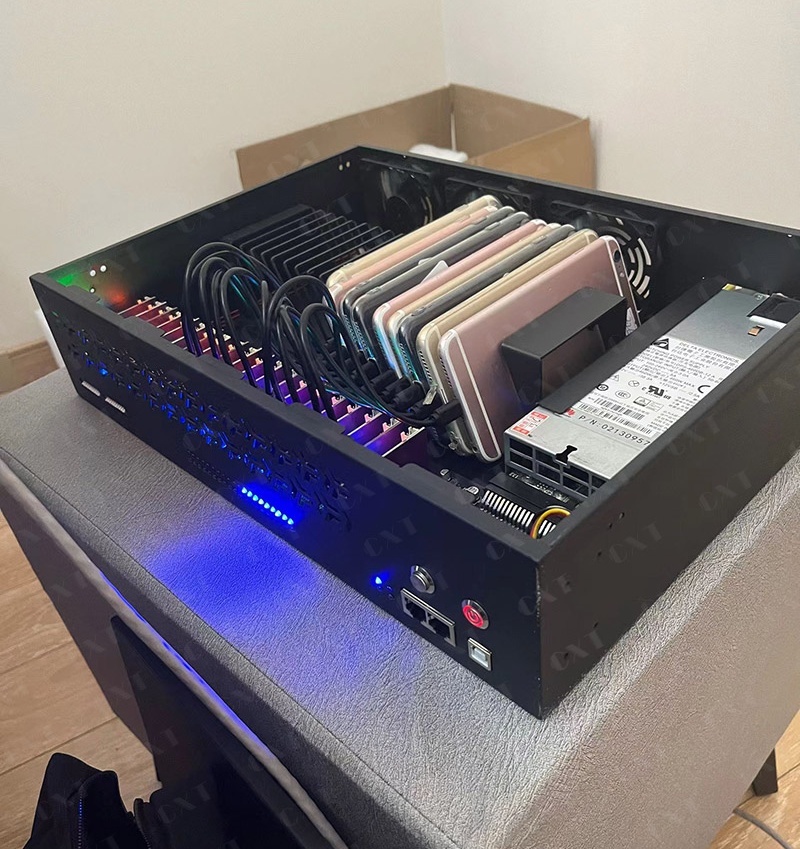
Phone Farm: Everything You Need to Know About Building and Managing Multiple Devices
Types of Phone Farms
Each of the phone farms has a specific target in mind. Based on the requirements of the business, different hardware, software, and management techniques will be applied. While some organizations require enterprise-level infrastructure capable of supporting hundreds of interconnected devices, others need small-scale infrastructure for development purposes. Business entities will be able to select the suitable solution by being familiar with various phone farms.
Personal Phone Farm
A personal farm of phones is a small setup that includes five to twenty smartphones connected to a single PC. Personal farms are widely used by individual developers, contractors, and researchers for application tests and study purposes.
Personal farm is easy to maintain and affordable. Personal farms provide a good testing ground for applications on physical devices before proceeding to bigger installations despite limited scalability.
Common Features
- 5–20 smartphones
- One powered USB hub
- Single management computer
- Basic cooling
- Standard internet connection
Best For
- Mobile app developers
- QA beginners
- Learning mobile automation
- Prototype testing
Business Phone Farm
It becomes difficult for one to manage many devices manually as companies grow. The phone farm for a company normally allows many teams to work simultaneously and has between 20 and 100 devices.
Through such technology, centralised software deployment, remote monitoring, automation and setting of test environments becomes easier.
Advantages
- Faster testing cycles
- Centralized management
- Improved productivity
- Better reporting
- Easier maintenance
Enterprise Phone Farm
The ideal customers for the phone farms in enterprises are the large companies whose mobile phones range from hundreds to thousands in different projects.
The presence of dedicated servers, monitoring software, intelligent power management, network security, and automated reporting are common within these environments.
Scalability, security, and high availability are prioritized when it comes to infrastructure within enterprises where downtime is kept at bay.
Typical enterprise environments include:
- Multiple device racks
- Redundant internet connections
- Backup power systems
- Automated health monitoring
- Centralized dashboards
- Role-based access control
Cloud-Based Phone Farm
Through secure web interfaces, cloud-based phone farms enable teams to remotely access physical cellphones.
Organisations can connect to devices housed in expert data centres rather than managing hardware internally.
Benefits include:
- No hardware maintenance
- Faster deployment
- Remote accessibility
- Flexible scaling
- Lower infrastructure management
Cloud-based environments are particularly useful for distributed teams that require continuous access to real devices.
Dedicated Testing Phone Farm
For the sole purpose of testing mobile applications, some companies construct phone farms.
These settings comprise gadgets with various
- Android versions
- Screen sizes
- Hardware manufacturers
- CPU architectures
- Memory configurations
Testing on diverse hardware ensures applications perform consistently across a wide range of user devices.
Phone Farm vs Device Farm
Although these terms are sometimes used interchangeably, they describe different concepts.
| Feature | Phone Farm | Device Farm |
| Primary Hardware | Smartphones | Smartphones, tablets, wearables, TVs, IoT devices |
| Purpose | Mobile device management | Multi-device testing ecosystem |
| Scalability | Medium to Very High | Enterprise-level |
| Hardware Diversity | Smartphones only | Multiple device categories |
| Remote Management | Yes | Yes |
| Automation Support | Yes | Yes |
| Enterprise Integration | Limited to mobile | Broader ecosystem support |
Which One Should You Choose?
In case you focus on smartphones and applications for phones, choose a phone farm.
Whereas if you are interested in having tablets, smart televisions, wearables, and more in the testing process, you should go for a device farm.
Phone Farm vs Emulator
One of the most common questions is whether businesses should use physical devices or software emulators.
The answer depends on the testing objective.
| Feature | Phone Farm | Emulator |
| Uses Real Hardware | ✅ Yes | ❌ No |
| Camera Testing | ✅ Yes | Limited |
| GPS Accuracy | ✅ Yes | Simulated |
| Battery Testing | ✅ Yes | No |
| Sensor Testing | ✅ Yes | Limited |
| Performance Testing | Accurate | Approximate |
| Startup Cost | Higher | Lower |
| Scalability | High | High |
| Maintenance | Required | Minimal |
Advantages of Real Devices
Physical smartphones offer precise information about:
Battery use
Switching networks
quality of the camera
Touch sensitivity
Behaviour of sensors
Bluetooth connections
NFC capabilities
Acceleration of hardware
Thermal efficiency
Accurately replicating these factors in an emulator is challenging, if not impossible.
When Should You Use an Emulator?
Emulators are useful for:
Early phases of development
UI design
First debugging
Quick prototyping
Fast validation of features
To balance accuracy and speed, several organisations use emulators in conjunction with a phone farm.
Benefits of a Phone Farm
1. Accurate Real-World Testing
Different hardware configurations cause applications to behave differently. Teams can find compatibility issues prior to launch by using real smartphones, which highlight difficulties that virtual environments frequently overlook.
2. Centralized Device Management
It is ineffective to manage several smartphones separately.
With a phone farm, administrators can:
- Install programmes from a distance
- Install updates
- Restart gadgets
- Observe your health
- Gather logs
- Keep track of your inventory
Centralisation increases consistency while lowering manual labour.
3. Increased Efficiency
Activities such as app installation, running test cycles, capturing screenshots, and reporting are made redundant through automation.
The teams have more time available to improve the quality of their products.
4. Efficient Use of Resources
It becomes possible for organisations to utilise their shared infrastructure rather than spending money on duplicate hardware for individual teams.
It decreases cost and increases efficiency in using the hardware.
5. Faster Release Cycles
Time taken in validation is reduced dramatically as testing is done simultaneously on several handsets.
Release of software becomes quicker without compromising on quality.
6. Device Monitoring Improvement
Through constant monitoring, the administrator is able to detect:
- Battery deterioration
- Network failure
- Storage limitations
- High temperatures
- Application crash
Hardware failure is prevented and downtime is reduced through early detection.
7. Device Maintenance
Phone farms that are efficiently managed make maintenance much easier for the administrator.
This will allow the administrator to:
- Update schedules
- Replace broken devices
- Monitor charging
- Perform preventive maintenance
The longevity of the hardware is increased through proper maintenance.
8. Scalable Infrastructure
It is possible to integrate more devices as an organisation expands without completely revamping the infrastructure.
Scalable architecture preserves operational effectiveness while enabling future growth.
Business Applications of a Phone Farm
Phone farms support numerous legitimate business operations across different industries.
Mobile Application Development
Prior to the launch of an application, developers perform functional tests on real devices.
The use of multiple cellphones helps identify such issues as:
- Layout issues
- performance bottlenecks
- device-related issues
- compatibility problems
Quality Assurance
In order to guarantee that the software functions consistently under different hardware configurations, QA professionals conduct consistent testing.
Test cases may be automated and manual and performed at once along with phone farms.
Mobile Device Management
Centralized installation of software, application control, and monitoring are some benefits that can be gained from this type of approach by companies owning big fleets of corporate smartphones.
Innovation and Research
Phone farms enable researchers to test mobile technologies, behavior of applications, patterns of user interaction, and performance metrics.
Business Mobility
A stable infrastructure is required for companies deploying mobile applications within the organization so that testing could be performed before roll out to the whole company.
Education and Training
Training organisations, technical schools, and universities use
phone farms to instruct:
- Development of mobile
- Testing software
- Automation
- Device control Android troubleshooting
Students get hands-on experience with actual hardware.
Enterprises Using Phone Farms
Phone farms have become increasingly common among businesses where cell phones play an integral role.
Application Development Companies
The use of phone farms is made by developers in order to improve the quality of software and avoid compatibility issues before launching their products.
Testing Companies for Mobile Application
Testing companies check the application of their clients on different hardware configurations in order to ensure reliability of their work.
Enterprise IT Departments
Large organizations use central device infrastructure to handle many corporate devices.
Higher Learning Institutions
Rather than relying only on simulations, training institutes provide hands-on training with actual mobile devices.
Research Organizations
Researchers use controlled test environments to study mobile operating systems, performance of applications, and behavior of devices.
Cybersecurity Teams
The security experts test the mobile apps using isolated testing environments to detect vulnerabilities and ensure that there is software security deployment.
Telecom Companies
When new services are being launched by the telecoms, they need to conduct performance tests on the devices and network compatibility.
Hardware Manufacturers
The phone farms are being utilized by the manufacturers to conduct performance tests and ensure the cross-compatibility of devices.
How to Build a Phone Farm
Building a reliable phone farm requires careful planning. A structured approach ensures stability, scalability, and easier maintenance.
Step 1: Identify Your Goal
Determine the requirement for a phone farm.
Typical goals consist of:
- Testing of mobile applications
- Management of devices
- Automation
- Investigate
- Instruction
- Deployment of enterprises
Infrastructure design, software selection, and hardware requirements are all influenced by a well-defined goal.
Step 2: Choose the Correct Tools
Choose tools that represent your target market well.
Considerations include:
- Operating system versions
- Screen resolutions
- Processors types
- Memory
- Storage
- Different manufacturers
Accuracy of testing can be achieved through a balanced set of tools.
Step 3: Construct Layout for the Rack
Construct a good layout that allows you to have:
- Easy access to hardware
- Good ventilation
- Cable routeing
- Future expansion
- Clear labeling
A well-laid rack reduces time for troubleshooting.
Step 4: Installation of good power system comes fourth in our list.
For continuous charging, you will need:
- USB hubs with power
- Surge protection
- UPS
- Smart charging
Hardware is protected and downtime is reduced through good power systems.
Step 5: Network Configuration
Make use of switches, routers, and wireless connection in order to create a proper network environment.
Proper network design will improve the level of communication between devices and reduce latency.
Step 6: Installation of Management Software is.
- Monitor devices
- Remote control
- Automation
- Reporting
- Monitor performance
Centralized management improves operational efficiency greatly.
Step 7: Evaluate and Improve
Make sure all components work properly before scaling.
Verify:
- Connectivity of devices
- Performance of charging
- stability of the network
- Communication using software
- Levels of temperature
- Workflows for automation
A successful pilot programme offers a strong basis for further growth.